
How to Maintain Rankings after a Redesign:
A Comprehensive Guide
Written by Scott Van Achte
Table of Contents
How to Maintain Rankings after a Redesign
- Conduct a Comprehensive Audit
- Choose an SEO-Friendly CMS
- Establish a Backup and Recovery Plan
- Preserve Existing Content
- Maintain URL Structure
- Implement 301 Redirects
- XML Sitemaps
- Title Tags and Meta Descriptions
- Utilize Structured Data
- Optimize Site Navigation
- Enhance Mobile Responsiveness
- Improve Page Load Speed
- Unblock The New Site!
- Monitor SEO Performance Post-Launch
- Plan for Content Updates and Freshness
How Do I Maintain Rankings when Changing Domains
TL;DR; SummaryLooking for a quick high-level summary for what you need to watch out for when redesigning your site? This section will cover the basics. Follow the links for more comprehensive information on each topic. Conduct a Comprehensive SEO Audit Before RedesignConducting an SEO audit before a redesign helps identify strengths and weaknesses, guiding the redesign process for better search performance. Learn more about: SEO audits Choose an SEO-Friendly CMSSelecting an SEO-friendly CMS ensures easy customization of SEO elements and enhances your site’s long-term success. Learn more about: SEO-friendly CMS Establish a Backup and Recovery PlanCreating a backup and recovery plan protects your site’s data during a redesign and ensures swift recovery from potential issues. Learn more about: Backup plans Preserve Existing ContentMaintaining existing high-performing content during a redesign is essential for retaining rankings and attracting organic traffic. Learn more about: Preserving content Maintain URL StructureKeeping a consistent URL structure is crucial for preserving SEO rankings and ensuring user accessibility during a redesign. Learn more about: URL structure Implement 301 RedirectsSetting up 301 redirects is crucial for guiding users and search engines from old URLs to new ones, preserving SEO value. Learn more about: 301 redirects Update Title Tags and Meta DescriptionsUpdating title tags and meta descriptions during a redesign is essential for maintaining SEO rankings and improving user engagement. Learn more about: Title tags Utilize Structured DataImplementing structured data enhances search engine understanding of your content, improving visibility and click-through rates. Learn more about: Structured data Optimize Site NavigationWell-structured site navigation improves user experience and SEO by making it easier for users to find content. Learn more about: Site navigation Enhance Mobile ResponsivenessEnsuring mobile responsiveness is critical for user experience and SEO, as Google considers mobile-friendliness a ranking factor. Learn more about: Mobile responsiveness Improve Page Load SpeedOptimizing page load speed is crucial for user satisfaction and SEO, as slow-loading pages can negatively impact rankings. Learn more about: Page load speed Unblock The New Site!Removing blocks on development sites is essential to allow search engines to index your new site upon launch. Learn more about: Unblocking your new site Monitor SEO PerformanceMonitoring SEO performance after a redesign helps identify issues and ensures your strategies remain effective. Learn more about: SEO performance Plan for Content Updates and FreshnessOngoing content updates are vital for maintaining relevance and engagement, signaling to search engines that your site is active. Learn more about: Content updates How Do I Maintain Rankings when Changing DomainsWhen changing domains, careful planning and execution of 301 redirects are critical to retain SEO rankings and authority. Domain Name SelectionChoosing an appropriate domain name involves considering branding and SEO factors to ensure long-term success. Learn more about: Domain name selection Inbound LinksUpdating off-site inbound links is important for retaining authority during a domain change; 301 redirects may not cover all links. Learn more about: Inbound links Change of Address Tool (GSC)The Change of Address tool in Google Search Console is essential for notifying Google of your new domain, facilitating smoother transition. Learn more about: Google’s change of Address Tool Update Internal LinksUpdating inline links within your content is crucial during a redesign to ensure they point to the correct pages on the new domain. Learn more about: internal links |
How to Maintain Rankings After a Redesign
I am designing a new website. How can I maintain my search rankings?
StepForth has been in the SEO game since 1997. I joined the team in 2003. A lot has changed since then, but one question I have received more than any other over the years is, “How do I maintain rankings after a redesign?”.
Site redesigns are an inevitable part of a website’s evolution. As technologies and user demands change, your site needs to adapt to maintain a modern feel that functions properly over an ever expanding range of devices.
The purpose of this post is to cover all critical aspects of a site redesign that may have negative repercussions on your sites SEO and Organic traffic.
Maintaining Rankings on SEO 101
Be sure to check out our discussion on this topic on SEO 101!
SEO 101 Ep 513 on WMR.fm
Conduct a Comprehensive SEO Audit Before Redesign
Evaluate key elements such as site structure, content quality, keyword rankings, and backlink profiles. Use tools like SEMrush or Ahrefs to analyze these components and gather data on your site’s performance.
Identify high-performing pages and keywords that drive traffic, as well as any areas that require improvement, such as pages with high bounce rates or low engagement. This information will guide your redesign strategy, ensuring that you maintain and enhance your SEO performance. A thorough audit serves as a roadmap for your redesign, helping you make informed decisions.
Using a spreadsheet is often the easiest way to lay out this data. Using Screaming Frog you can easily export all of your URLs, Meta Descriptions, Title Tags, and other useful data.
Choose an SEO-Friendly CMS
Selecting the right Content Management System (CMS) can significantly impact your website’s SEO. An SEO-friendly CMS allows for easy customization of essential SEO elements such as title tags, meta descriptions, alt attributes for images, and URL structures. Not all systems allow custom code to be added. In some CMS’s adding things like Structured Markup may be difficult or near impossible, so ensuring that the system you choose will have full SEO functionality is often critical.
When choosing a CMS for your redesign, prioritize platforms that offer built-in SEO functionalities or plugins that simplify optimization processes. WordPress, for example, is popular for its SEO-friendly features and extensive range of plugins, such as Yoast SEO, which assist in optimizing content.
Ensure the CMS you choose supports responsive design, as mobile-friendliness is a crucial ranking factor. Additionally, consider the speed and performance of the CMS, as page load times directly affect user experience and SEO. A well-chosen CMS can streamline your SEO efforts and support the long-term success of your website.
Establish a Backup and Recovery Plan
A backup and recovery plan is an often-overlooked aspect of website redesigns, but it is essential for protecting your site’s data and SEO integrity. During a redesign, unforeseen issues can arise, leading to potential data loss or site downtime.
Establish a comprehensive backup strategy that includes regular backups of your site’s content, database, and configurations. Use reliable backup solutions that allow for easy restoration in case of errors or issues post-launch.
Additionally, implement a recovery plan to address potential SEO setbacks. This could involve setting up monitoring tools to quickly identify issues like broken links, lost rankings, or crawl errors. Having a well-defined backup and recovery plan ensures that you can swiftly address any problems that arise, preserving your site’s performance and SEO value.
Also be sure to hold onto a backup of you previous website. In my years of experience I have not personally seen a handful of times where technological issues were discovered after launch requiring a roll-back to the previous website. While rare, this can happen and a simple back up can temporarily save the day!
Preserve Existing Content
Content is the backbone of SEO. During a website redesign, it’s vital to preserve existing content to maintain rankings and continue attracting organic traffic. Content that performs well should be migrated to the new site without significant changes to its core structure.
As mentioned earlier, before the redesign, conduct a content audit to identify high-performing pages. Ensure that high performing content is migrated correctly, retaining its URL structure where possible.
If updates to the content are necessary, maintain keyword relevance and quality to keep the content aligned with user intent.
Consider enhancing existing content with updated information, visuals, or additional resources to improve engagement and the overall value of the page for search engines and readers alike.
Consider current factors useful for LLMs (Large Language Models) like ChatGPT Search and others.
LLM Friendly Site Features
When it comes to SEO, these days one must also consider AI.
LLMs (Large Language Models) such as ChatGPT Search, Perplexity, and others need to be considered.
While a lot of fundamental SEO aspects will work for AI and traditional search engines, there are aspects that LLMs tend to like (current as of Nov 2025).
To help keep AI happy, be sure to include the following where possible:
| Technique | Details |
|---|---|
| Original Content | Always publish original data and content. Never steal or copy from other sources. |
| Structured Markup | Utilize structured markup including FAQPage, ItemList, and other relevant schemas to ensure search engines fully understand your content. |
| FAQs and Question-Based Content | Create FAQs and content that directly answers common questions to improve relevance and engagement. |
| Lists and How-To Content | Use lists and how-to formatted content, which tends to perform well with AI and enhances readability. |
| Supporting Sources | Ensure that your content is linked to supporting sources, even if they are to other websites. |
| Author Crediting | Ensure blog posts or articles are properly credited to the author and linked to a well-written bio. |
| Use of Media | Utilize images, videos, and other media to enhance the content and showcase your expertise. |
| Tables for Comparisons | Use tables for comparisons and other statistical data to present information clearly and effectively. |
| Readable Formatting | Use bullets and easy-to-read shorter paragraphs to improve user experience and comprehension. |
Freshen Up Your Content
Fresh and relevant content can boost your SEO rankings and help establish your authority in your niche. Ensure that all content is optimized for on-page SEO elements but that it is also authoritative and has the most recent and up to date information.
Maintain URL Structure
Maintaining a consistent URL structure is crucial for preserving SEO rankings during a website redesign. URLs act as addresses for your web pages, and any changes can disrupt search engine indexing and user accessibility. Whenever possible, I always recommend keeping existing URLs to avoid losing traffic and authority.
If you must change URLs, implement 301 redirects to ensure that visitors and search engines are directed to the new pages. This not only retains link equity but also helps minimize user frustration. Ensure that the new URLs are clean, descriptive, and keyword-rich to reflect the content of the page accurately.
Audit Your URL Structure
Conduct a thorough audit of your current URL structure and plan the new one meticulously. Use tools to identify high-traffic pages and prioritize their preservation. Remember, consistency and clarity in URL structure enhance both user experience and search engine crawling efficiency.
I strongly recommend making a list of the most important URLs on your site. Find which pages represent the most in terms of organic rankings, entry points to your site, pages that convert into sales, etc. These URLs are the ones you most want to ensure remain the same. Changing them, even with redirects in place, will most likely result in a reduction in rankings and traffic.
Unless your current site has significant problems with the URL structure, in nearly all cases I would recommend those URLs be retained. Here are some examples for bad URLs
| Bad URL Examples | Why it is bad |
| Dynamic URLs with Excessive Parameters | |
|
example.com/product?id=123&sessionid=456&ref=789 Use this URL instead: |
Use of many variables and session ids can be difficult for search engines to index and for users to remember. |
| Excessively Long URLs | |
|
example.com/category/subcategory/2025/10/23/this-is-a-very-long-title-that-continues-and-goes-on-and-on Use this URL Instead: |
Extremely long URLs truncate in search results making them less user friendly and harder to share. |
| URLs with Unreadable Characters | |
|
example.com/!@#$%^&*() Use This URL Instead: |
Special characters and symbols confuse both users and search engines and can lead to poor user experience and indexing issues. |
If you find that your current site has examples of bad URLs, you may want to consider updating them to something that is both user and search engine friendly.
WWW in URLs
Another consideration that is often over-looked is the use of the WWW in your URLs. The recommendation here is relatively simple. If your website currently uses WWW, then it should continue to use it. If you do not use WWW, continue not using it. Ensure that the variant you are not using is 301 redirected to the version you are using. (This is important whether you are changing the format or keeping it the same)
Implement 301 Redirects
In the last section we discussed the importance of maintaining the same URL structure, but sometimes this is simply not an option. This is where 301 redirects come into play. 301 redirects are essential for guiding users and search engines from old URLs to new ones.
When your website undergoes a redesign, it’s likely that some URLs will change, and failing to set up redirects can lead to 404 (not found) errors, resulting in lost traffic and poor user experience.
To implement 301 redirects, create a mapping of old URLs to new ones, ensuring that each redirect points to a relevant page. This process helps maintain search engine rankings by transferring link equity from the old page to the new one. Personally I like to use Excel to set this up due to its simplicity.
After Site Launch
Use tools like Google Search Console and Screaming Frog to monitor your redirects and identify any issues that may arise post-launch. Additionally, ensure that your redirects are functioning correctly and that users are landing on the appropriate content. A well-structured redirect strategy not only preserves SEO value but also enhances user satisfaction by providing seamless navigation.
Google Search Console
After your new site has launched, reports within Google Search Console can be incredibly helpful in identifying URLs you may have missed when setting up your redirects. These will often appear as “404 errors” within GSC. When you see these appear, ensure that you quickly redirect them to the appropriate replacements.
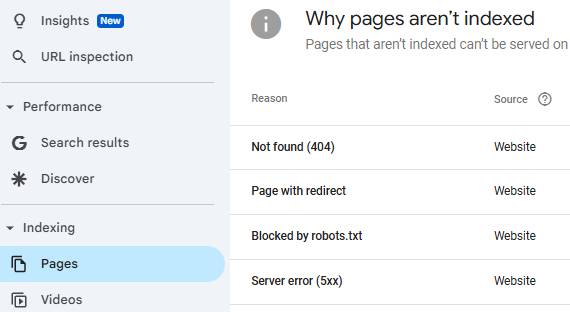
You can find “Not Found (404)” errors under: Indexing > Pages, within Google Search Console
Screaming Frog
Using a Tool like Screaming Frog can help identify issues in your link structure also. Even with 301 redirects in place, all source URLs within your content should be updated to point directly to the correct URL. Screaming Frogs “Response Codes” tab will help you find any of these links that require updating.
Here you can get a full listing of all 3xx redirects, 4xx not found errors, 5xx server errors, and other URL header statuses.
Use this to find those URLs that still need redirects put into place or require link adjustments within your site content.
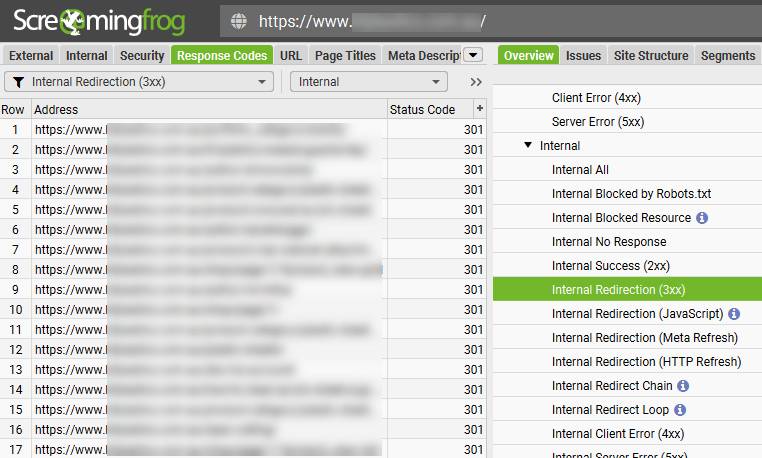
View of Response Codes Tab within Screaming Frog, showcasing Internally Redirecting Pages (3xx Redirects)
XML Sitemaps
Most sites these days utilize Content Management Systems, and in most cases XML Sitemaps are managed using a plugin, module or app. As a result, you will not likely have to address changes in URLs within your XML Sitemap; this should happen automatically.
That said, sometimes it does not.
Ensure that your XML Sitemap accurately reflects any URL changes with your new site.
In most cases this will be a simple step that will not require much effort.
If your new site resides on a different content management system, there is a possibility that your XML sitemap will reside at a different URL.
If this is the case it is important to submit the new XML Sitemap URL to Google Search Console.
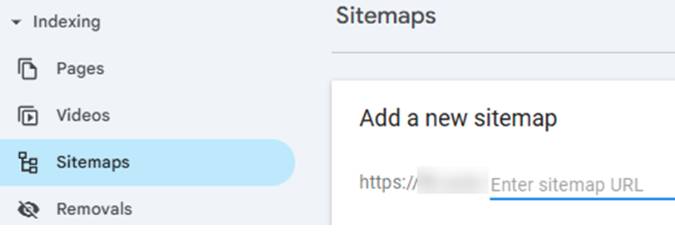
To submit an XML Sitemap, simply navigate to “Indexing > Sitemaps” and enter the XML Sitemap URL
Title tags still play a significant role in SEO, influencing search engine rankings, while Meta Descriptions only help indirectly, by hopefully improving click-through rates from search results to your site.
During a redesign, it’s crucial to copy these elements over to the new corresponding page providing they are performing well. If the content was not highly ranked before, update these elements to align with the new site structure and content.
Whenever updates are required, ensure that each page has a unique title tag that accurately describes its content while incorporating relevant keywords. Aim for a length of 50-60 characters to prevent truncation in search results, although there is a lot of evidence that going well beyond this max character limitation can still provide SEO value.
Similarly, update meta descriptions to provide a compelling summary of the page, encouraging users to click through. Typically, you should try to keep meta descriptions within 150-160 characters for optimal display.
Use SEO tools to analyze existing title tags and meta descriptions, identifying opportunities for improvement during the redesign.
Thoughtfully crafted tags and descriptions not only enhance rankings but also improve user engagement, making them essential components of your SEO strategy. Using Screaming Frog is useful for quickly reviewing all title tags for necessary improvements.
Are Meta Descriptions Important for SEO?
While Meta Descriptions only offer some indirect benefits in traditional search engines like Google and Bing, there is growing evidence to support their influence on rankings in various LLMs like ChatGPT and Perplexity reinforcing their continued importance.
Utilize Structured Data
Structured data, or schema markup, helps search engines understand the content on your website better. Implementing structured data during a redesign can enhance your visibility in search results and improve click-through rates by enabling rich snippets.
Identify the types of structured data relevant to your content, such as articles, products, or events, and implement the appropriate schema markup. This can provide additional context to search engines and help improve your rankings.
Use tools like the Schema.org Validator and Google’s Rich Results Test, or consider browser extensions such as “Detailed SEO Extension” to validate your markup and ensure that it’s functioning correctly.
Monitoring structured data performance post-launch is also essential, as any errors can impact how your content is displayed in search results. By leveraging structured data, you can enhance your site’s SEO performance and provide users with more informative search results.
While there is a long list of useful schemas, some of the most commonly used markup types include:
| Schema Type | Description |
| Organization | Represents an organization, such as a company or institution, providing information like name, logo, and contact details. Learn more |
| LocalBusiness | Describes a specific local business, including details about its location, services, and hours of operation. Learn more |
| Product | Used to specify information about a product, including its name, description, and offers for sale. Learn more |
| Event | Represents an event, detailing information such as the date, location, and ticket availability. Learn more |
| FAQPage | Indicates a page that contains a list of frequently asked questions and their answers. Learn more |
| HowTo | Describes a step-by-step guide on how to accomplish a specific task, including instructions and materials needed. Learn more |
| ItemList | Represents a list of items, such as products or articles, providing structured information about each item. Learn more |
| Review | Used to provide a review of an item, with details such as the rating, author, and review body. Learn more |
| Article | Represents a piece of content, such as a blog post or news article, with metadata like headline, author, and publication date. Learn more |
| Person | Describes a person, detailing information such as their name, job title, and contact information. Learn more |
| Breadcrumb | Indicates a breadcrumb trail, helping users and search engines understand the structure of a website. Learn more |
| VideoObject | Represents a video file, including information such as the title, description, and duration. Learn more |
Primary Navigation
During a redesign, prioritize creating a logical hierarchy that reflects the content structure of your site. Use clear and concise labels for your navigation and ensure that important pages are easily accessible from the homepage. This helps search engines crawl and index your site more effectively. Most sites use standard text based navigation in the header of the site with applicable drop-down menu items. Users and search engines can easily follow this form of navigation making it optimal for the end user experience as well as for SEO.
Navigational headings should have links within the drop-downs organized into similar and relevant sections.
Breadcrumb Navigation
Consider implementing breadcrumb navigation to enhance usability and provide additional contextual information to search engines. This can improve the internal linking structure and help users understand their location within your site.
Additionally, ensure that your navigation is mobile-friendly, as more users are accessing websites via mobile devices. A seamless navigation experience is vital for retaining visitors and improving SEO.
You should also implement Breadcrumb structured markup to provide further clarification for spiders.
Footer Navigation
It is also important not to underestimate the value of footer navigation on your site. Site footer navigation plays a crucial role in enhancing user experience and supporting SEO.
Here are some key points highlighting its importance:
| Key Reasons to Include Footer Navigation | |
|---|---|
| User Experience | Footers provide users with easy access to important links such as contact information, privacy policies, and terms of service. This accessibility can improve overall site usability and help users find relevant information quickly. |
| SEO Benefits | Including relevant links in the footer can enhance internal linking, helping search engines understand the site structure and boosting the visibility of important pages. It also allows for better navigation, which can lead to longer user sessions and lower bounce rates. |
| Mobile Optimization | On mobile devices, footer navigation can be particularly valuable as it allows users to access critical links without excessive scrolling, improving mobile usability. |
| Branding and Trust | A well-designed footer can reinforce branding through consistent visual elements and provide trust signals by including links to social media, customer testimonials, and certifications. |
| Content Hierarchy | Footers can help establish content hierarchy by highlighting secondary pages that may not be included in the main navigation. This ensures that users and search engines can discover and navigate to less prominent but still important content. |
Enhance Mobile Responsiveness
With an increasing number of users accessing websites via mobile devices, ensuring your site is mobile-responsive is critical for both user experience and SEO. Google considers mobile-friendliness a ranking factor, making it essential to optimize your site for various screen sizes during the redesign.
Use a responsive design approach to ensure that your site adapts seamlessly to different devices. Test your site across multiple platforms and devices to identify any issues with layout, navigation, or functionality.
Additionally, pay attention to mobile page load speeds, as slow-loading pages can negatively impact user experience and lead to higher bounce rates. Optimize images, leverage browser caching, and minimize HTTP requests to improve performance. A mobile-responsive design not only enhances user experience but also helps maintain your SEO rankings in an increasingly mobile-first world.
Improve Page Load Speed
Page load speed is a crucial factor in both user experience and SEO. Slow-loading pages can lead to high bounce rates and decreased user satisfaction, negatively affecting your site’s rankings. During a redesign, prioritize optimizing load speeds to enhance overall performance.
Begin by analyzing your current site’s speed using tools like Google PageSpeed Insights or GTmetrix. These tools can provide insights into areas needing improvement. Implement strategies such as optimizing images, reducing server response times, and leveraging browser caching to enhance load speeds.
Minimize the use of heavy scripts and plugins that can slow down performance, and consider using a Content Delivery Network (CDN) to distribute content efficiently. Regularly monitor page speeds post-launch to ensure ongoing optimization. A fast-loading site not only improves user experience but also positively impacts your search rankings.
Common Tools to help monitor Page Speeds include:
| Tool | Description |
|---|---|
| GTMetrix | Analyzes your website’s performance, providing insights on load times, page size, and recommendations for improvement. Learn more |
| Google PageSpeed Insights | Evaluates the performance of your web pages on both mobile and desktop devices, offering specific suggestions for enhancing speed and user experience. Learn more |
| Google Search Console | A comprehensive tool that helps monitor and maintain your site’s presence in Google search results, including performance metrics related to page speed. Learn more |
| Pingdom | Provides website speed testing and performance monitoring, allowing you to analyze load times and get insights into improving site efficiency. Learn more |
Unblock The New Site!
This last point, while seemingly obvious, is somehow often overlooked. Development sites should be blocked to search engines. Sometimes upon launch, developers forget to remove blocking. Typically this is done in the robots.txt file, robots meta tags, or on a higher level server setting. Do not forget to open the new site up upon launch!
Monitor SEO Performance
Monitoring your SEO performance after a website redesign is crucial for identifying any issues and ensuring that your strategies are effective. Changes in rankings, traffic, and user behavior can occur post-launch, making it essential to track these metrics closely.
Use tools like Google Analytics and Google Search Console to monitor key performance indicators. Pay attention to organic traffic, bounce rates, and conversion rates to gauge user engagement and satisfaction. Tools like SEMRush are helpful for tracking organic ranking trends for both selected search terms as well as seeing overall total rankings.
Regularly check for crawl errors or broken links that may arise from the redesign, and address them promptly to minimize negative impacts on SEO. Screaming Frog is your best friend when looking for these errors and broken links.
Conduct periodic audits to assess content performance and identify opportunities for optimization. By actively monitoring your SEO performance, you can quickly adapt your strategies and maintain your rankings.
Use a rank reporting tool, such as SEMRush, along side performance reports found in Google Search Console, to check on ranking trends to see how Google is reacting to your new site.
Plan for Content Updates and Freshness
Content freshness is a vital factor in SEO, as search engines favor sites that regularly update their content. During a redesign, plan for ongoing content updates to keep your site relevant and engaging.
Identify opportunities for creating new content based on current trends, user personas, user interests, or gaps in your existing content. If you do not already have a blog, consider incorporating one that allows for regular updates and fresh insights.
Additionally, review and refresh existing content to ensure it remains accurate and relevant. This could involve updating statistics, adding new visuals, or expanding on topics based on user feedback. A commitment to content freshness not only enhances user engagement but also signals to search engines that your site is active and valuable.
Different niches demand different levels of content creation. Look at your top-ranking competitors to get an idea of the sort of cadence that may be required for new content creation – but requirements may vary. High quality content is always better than a flood of lower level fluff pieces. If your competition is putting out a low-level blog post every day, you can likely outperform them with one or two high quality pieces a month.
How To Maintain Rankings When Changing Domains
If your website redesign also contains a rebranding and domain change, all of the above suggestions still apply, but there are a few additional areas that will also require attention.
Domain Name Selection
Selecting a domain name sounds like a simple process but there are many aspects here to consider. These include branding, content relevance, length, potential penalties in the domains history, and more. The purpose of this article though is specific to SEO considerations so our focus will be on factors related to rankings.
301 Redirects
When changing URL structure, 301 redirects are very important. When it comes to changing a domain name, they are hyper-critical. Since all URLs on your site will be changed, having your 301 redirects properly mapped out is of utmost importance.
For small or medium sized sites, one of the easiest ways to do this is to export your full list of URLs on the existing and new sites into Excel and then match them up. For very large sites, custom or creative solutions may be required.
URL Changes
One of the advantages of changing your domain is the fact that every single URL on your site will change. While this is an SEO disadvantage, it does give you the opportunity to make bigger sweeping URL changes without incurring additional risk. Changes to URL structure, page naming conventions, and usage of the WWW are all now on the table since you will be required to setup redirects anyways.
If you are looking at a domain name change, taking a deeper look at your internal URLs is certainly recommended to see if they can be cleaned up or improved for SEO.
Inbound Links
Some places where you may have links that can easily be updated include:
- Update Social Media Profiles
- Update Official Business Listings
- Author Profiles associated with blog guest posts
- Directory listings
- Forum user profiles
- Partnership or affiliate sites
Change of Address Tool (GSC)
Using the Change of Address tool in Google Search Console is crucial when changing your website’s domain because it helps inform Google of the new location of your site, facilitating a smoother transition in search rankings and indexing.
By notifying Google, you prompt it to update its index to reflect the new domain, ensuring that any existing authority, and ultimately traffic associated with the old domain, is transferred to the new one.
To use the tool, first, ensure you have verified ownership of both the old and new domains in Google Search Console, the old site needs to have 301 redirects active, and then, with both sites live, the change of address tool needs to be used by following the provided prompts.
| How to Use the Change of Address Tool | ||
|---|---|---|
| Step | Action | Description |
| 1 | Set up 301 redirects | Ensure that you have set up proper 301 redirects from the old domain to the new domain before proceeding. |
| 2 | Verify your sites | Make sure both the old and new domains are verified in Google Search Console. |
| 3 | Access the Change of Address tool | Go to the Change of Address Tool. |
| 4 | Select the old site | Choose the old domain from the dropdown menu. |
| 5 | Enter the new site address | Select the new domain where you want to redirect your traffic. |
| 6 | Submit your change of address | Click the “Submit” button to finalize the change. |
| 7 | Monitor your traffic | After a few weeks, check the performance in Search Console to ensure that traffic is being redirected correctly. |
After submission, monitor the performance of both domains to ensure a seamless transition and address any potential issues that may arise.
Update Internal Links
With a redesign and domain change, updating primary site navigation such as header, dropdown, footer, and other prominent links is usually a given. But one area that designers often forget about are inline links within the sites content.
These are links that may be found in the middle of paragraph content, linked images, or buttons on internal pages, and even within structured markup found behind the scenes.
While a proper 301 redirect strategy will catch these making the end user no wiser, it is still very important to update links to point to the correct pages on the new domain.
The easiest way to find all of these links is to crawl the new site using screaming frog and to look for external links that direct to pages on the old top level domain.